
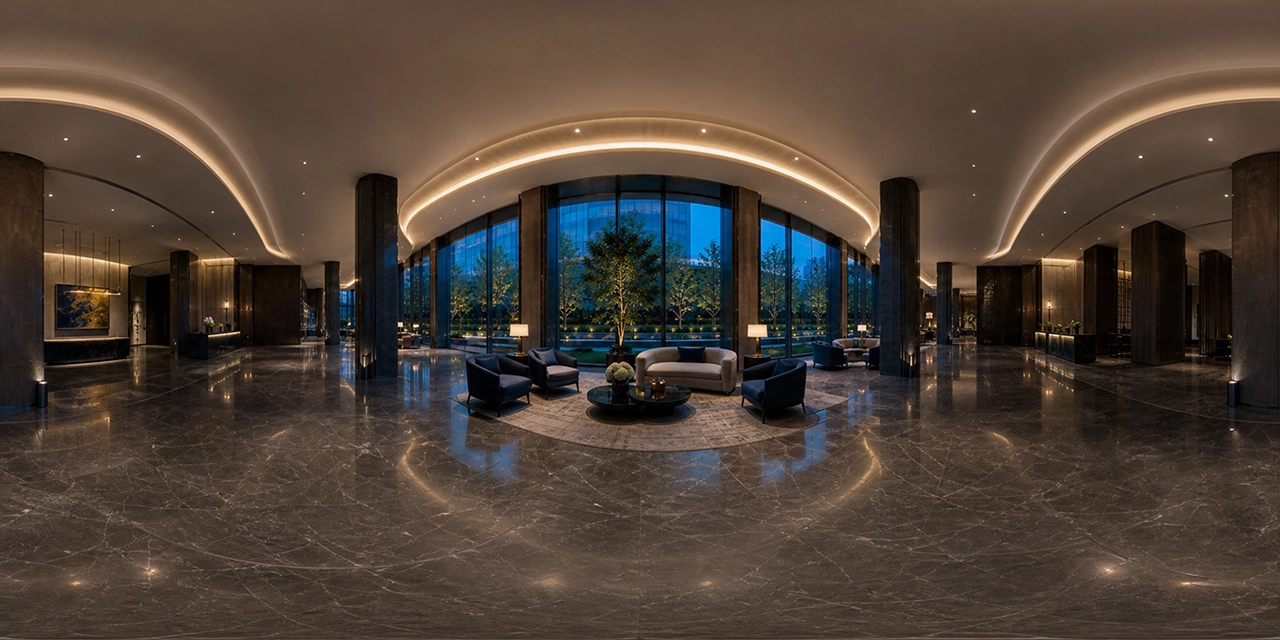
A360 Panorama Hero turns a standard WordPress hero into an interactive 360° scene while keeping headings, paragraphs, buttons, groups and columns editable as native WordPress blocks. Use a properly optimized 2:1 equirectangular image, a readable overlay and restrained autoplay for the best result.
PANORAMA HERO CAPABILITIES
Key features
An immersive WebGL panorama combined with content that remains editable, translatable and accessible as real WordPress blocks.
+
Native Gutenberg content
Place headings, paragraphs, buttons, groups and columns inside the panoramic Hero.
+
Media Library workflow
Select a 2:1 equirectangular image and an optional poster directly from WordPress.
+
Block and shortcode
Use the visual A360 Panorama Hero block or integrate a viewer through the a360_panorama shortcode.
+
Motion controls
Configure rotation speed, resume delay and always, reduced-motion-aware or disabled autoplay.
+
Field of view
Choose an initial FOV suited to the scene and the intended visual emphasis.
+
Responsive presentation
Adapt the panoramic area and content layout across desktop, tablet and mobile screens.
+
Interactive controls
Support drag, touch interaction, keyboard focus and a visible rotation pause button.
+
Poster and loading state
Show a fallback image while WebGL initializes and provide a clear error state if loading fails.
When an interactive panorama improves a Hero
A panoramic Hero works when the environment is part of the value proposition: architecture, property, hospitality, tourism, industrial facilities, events, showrooms or virtual-tour software. It can also provide an abstract spatial background for a technology platform—as long as the movement does not compete with the page message.
Do not add 360° only because it is visually impressive. The heading, explanation and primary action still need to be understood immediately. The panorama should strengthen context and demonstrate capability.
How to prepare a panorama image
Use an equirectangular image with a 2:1 aspect ratio. The left and right edges must join naturally because the viewer wraps them around a sphere. Keep important objects away from the top and bottom poles, where stretching is strongest.
Compression matters because panoramic images contain many pixels. In the A360 ecosystem Hero, converting the generated 1774 × 887 panorama from PNG to WebP reduced the file from about 1.6 MB to about 91 KB while preserving dimensions.
How to build A360 Panorama Hero
- Install and activate A360 Panorama Hero.
- Add the A360 Panorama Hero block in the WordPress editor.
- Select a 2:1 panorama from the Media Library.
- Add native heading, paragraph and button blocks inside the Hero.
- Choose the height, initial field of view and content alignment.
- Set overlay opacity so the copy passes a practical readability check.
- Configure rotation speed, resume delay and autoplay behavior.
- Test mouse, touch and keyboard interaction on the published page.
The shortcode is useful for template integrations: . The block is usually better for editors because its content remains composed of native WordPress blocks.
Performance recommendations
- Convert PNG panoramas to WebP when transparency is unnecessary.
- Do not load several WebGL panoramas above the fold.
- Use a poster to prevent a blank loading state.
- Keep rotation slow and pause when the tab is not active.
- Test the Largest Contentful Paint element after deployment.
- Do not use a much larger source than the expected display and zoom requirements justify.
Motion, controls and readable content
Autoplay should respect reduced-motion preferences or be disabled when motion is not essential. Users need a visible pause control, a meaningful region label and sufficient contrast for content. Text must remain HTML—not pixels embedded in the panorama—so that it can be selected, translated, indexed and read by assistive technologies.
Turn your WordPress Hero into a 360° experience
Use A360 Panorama Hero to combine an immersive scene with editable WordPress content.
Frequently asked questions
Which image ratio should I use?
Use a 2:1 equirectangular panorama, for example 4000 × 2000 or 2000 × 1000 pixels.
Is WebP suitable for panoramas?
Yes. It often provides a major reduction compared with PNG for photographic and rendered imagery.
Can the Hero content be edited in Gutenberg?
Yes. The A360 Panorama Hero block supports native WordPress blocks inside the panoramic section.